Toolkit · $39 · Digital download
Run the numbers on an Alaska rental before you make an offer
A spreadsheet that turns one property’s numbers into cash flow, cap rate, cash-on-cash return, DSCR, a 1% rule check, break-even rent and a sensitivity table, with separate lines for the costs Alaska owners can’t skip: heat, snow removal and capital repairs.
$39
Buy now: $39Secure checkout by Stripe. After you pay, you go straight to your download page. Digital download. Sold by Aurora Information Services LLC, Anchorage, Alaska.
What it calculates
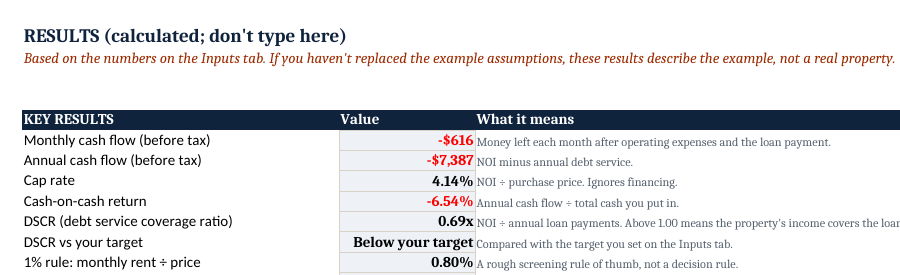
| Monthly and annual cash flow | What’s left after operating expenses and the loan payment (before income taxes) |
|---|---|
| Cap rate | Net operating income ÷ purchase price |
| Cash-on-cash return | Annual cash flow ÷ the cash you put in (down payment, closing costs, upfront repairs) |
| DSCR | Net operating income ÷ annual loan payments, checked against a target you set |
| 1% rule check | Monthly rent as a share of price. A quick screen, not a decision rule. |
| Break-even rent | The monthly rent at which cash flow is $0, and how far your rent is above or below it |
| Sensitivity table | Monthly cash flow across 5 rent levels × 5 interest rates, plus a vacancy row from 0% to 15% |
Built for Alaska line items
- Heating and utilities as separate monthly lines, for owner-paid heat in older multi-units
- Snow removal as its own annual cost, not buried in “maintenance”
- A CapEx reserve (roofs, boilers, water heaters) included in net operating income
- Property taxes and insurance entered from your own quotes and the local assessor
How it works
- Open it in Excel, Google Sheets or LibreOffice. No macros, no add-ins.
- Replace every yellow cell on the Inputs tab with numbers for your property. Each input has a note on where to find the real number.
- Read the Results and Sensitivity tabs. A 5-page PDF guide explains what each result means and how to read it.
The honest part
- It does not include Alaska market data. The example inputs are made up for illustration. Your answer is only as good as the numbers you enter.
- It’s a first-year snapshot. It doesn’t model appreciation, depreciation, income taxes or a sale.
- The math was checked by recalculating the workbook in LibreOffice and comparing every result against an independent calculation across seven test scenarios. Still, verify anything you’ll rely on.
Not financial, legal, tax or investment advice. This is a calculator, not a recommendation to buy any property. Real estate investing carries risk, including loss of capital. Talk to a licensed lender, CPA or attorney before you make a decision.
Who it’s for
People sizing up a single-family rental or small multi-unit, such as a duplex or fourplex, in Anchorage, Mat-Su or elsewhere in Alaska. It pairs with my book Alaska Real Estate Investing, and you don’t need the book to use it.
Questions
Does it work in Google Sheets?
Yes. Upload the .xlsx to Google Drive and open it with Google Sheets. It also works in Excel and LibreOffice.
Can I use it for a duplex or fourplex?
Yes. Enter the total monthly rent for all units and the owner-paid costs for the building.
Does it tell me whether to buy?
No. It shows the math on the numbers you enter. The decision is yours, ideally with a lender and CPA.
Where do the example numbers come from?
They’re made-up illustration values chosen to show how the sheet works. They aren’t averages or market data.
What if it’s not for me?
All sales final on digital downloads. If a file doesn’t work, email jeremy@jeremycounter.com within 14 days and I’ll fix it or refund you.
$39
Buy now: $39Secure checkout by Stripe. After you pay, you go straight to your download page. Digital download. Sold by Aurora Information Services LLC, Anchorage, Alaska.